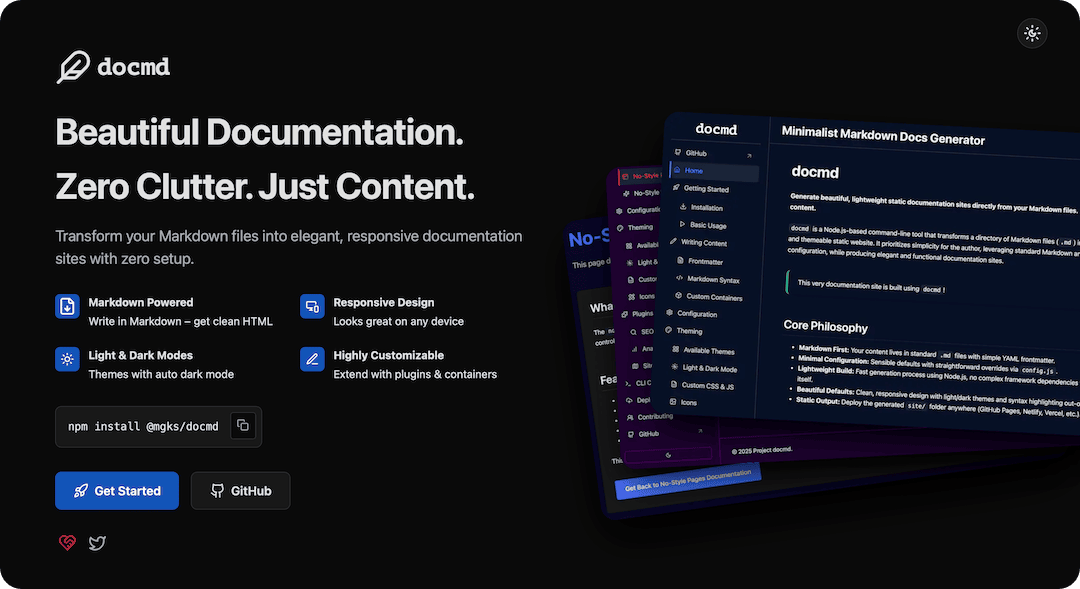
Six months ago, I hit a breaking point. I was maintaining documentation for a dozen different projects, and I was exhausted. Not by the writing-I enjoy explaining code-but by the tools.
Every time I wanted to spin up a simple docs site, I faced a dilemma:
- Use MkDocs: Great output, but forcing a Python/Pip environment into a pure Node.js CI/CD pipeline felt like pollution.
- Use Docusaurus: The gold standard, but heavy. Dealing with React hydration errors, massive node_modules, and complex Webpack configs just to render static text felt like killing a fly with a bazooka.
I wanted something in the middle. Node.js native, but logic-free. Zero config. Zero client-side bloat. Just Markdown in, HTML out.
So, I built docmd.
What started as a simple renderer has evolved-over a dozen releases-into a robust documentation platform. With the release of v0.3.0, docmd is no longer just a “script.” It is a fully-featured static site generator that rivals the giants, without adopting their bloat.
Here is why developers are switching.
The Philosophy: Zero Clutter, Just Content
Modern web development has an obsession with JavaScript. We treat static content like dynamic applications. We ship megabytes of JSON and JS bundles just to render a paragraph of text.
docmd takes a step back. It generates Semantic, Static HTML.
- No Hydration Gap: The page is ready the millisecond the HTML loads.
- Perfect SEO: Search engines love raw HTML structure.
- Universal: It works on a 3G connection, on an old phone, and even with JavaScript disabled (mostly).
But being “lightweight” doesn’t mean being “feature-poor.”
The Discovery Update: Instant, Offline Search
The biggest friction point with static sites is usually Search. Most generators force you to use external services like Algolia DocSearch. While powerful, Algolia requires API keys, cloud accounts, and internet access.
In v0.3.0, we solved this.
docmd now includes a Built-in, Full-Text Search Engine.
- Zero Config: You don’t do anything. The build process automatically scans your content, strips HTML tags, and generates a highly optimized index.
- 100% Local: The search runs entirely in the user’s browser using
MiniSearch. It works on intranets, air-gapped networks, and airplanes. - Fuzzy Matching: It handles typos gracefully.
- Smart Snippets: It doesn’t just list page titles; it shows you the exact sentence where your keyword appears, highlighted in context.
Press Cmd+K on any docmd site. It feels like magic, and it requires zero external dependencies.
Rich Content: Beyond Standard Markdown
Standard Markdown is great, but documentation needs more. It needs alerts, tabs, and diagrams. docmd extends Markdown with a custom container syntax that is easy to read and write.
The Timeline Changelog
Documenting version history is critical. We introduced a dedicated ::: changelog container that automatically formats your release notes into a beautiful, vertical timeline-separating metadata (dates/versions) from the narrative.
Interactive Elements
- Callouts: Distinct blocks for warnings, tips, and info.
- Tabs: Group code examples for different languages/OSs without cluttering the page.
- Mermaid: Full support for flowcharts and sequence diagrams, which-crucially-automatically adapt to Light/Dark mode.
Developer Experience (DX) First
If a tool is hard to configure, it’s failed. We spent the last few releases obsessing over the “Developer Experience.”
- Smart Validation: If you make a typo in your
docmd.config.js(likecustomCSSinstead ofcustomCss), the CLI will catch it and suggest the fix immediately. No more silent failures. - Asset Minification: Run
docmd build, and we automatically compress your CSS and JS usingesbuildandclean-css. Rundocmd dev, and we skip it for speed. - Platform Agnostic: We fixed path resolution logic to ensure it works flawlessly on Windows, Linux, and macOS.
The Landscape: Where do we fit?
| Feature | docmd | Docusaurus | MkDocs (Material) | Mintlify |
|---|---|---|---|---|
| Core | Node.js | React | Python | Proprietary |
| Output | Static HTML | React SPA | Static HTML | Hosted / Next.js |
| Setup | ~2 mins | ~15 mins | ~10 mins | Instant |
| Search | Offline / Built-in | Algolia (Cloud) | Built-in | Built-in |
| Cost | Free OSS | Free OSS | Free OSS | Freemium |
Choose docmd if: You are a JavaScript/Node developer who wants fast, clean, self-hosted documentation without managing a React dependency tree or installing Python.
The Future
We are just getting started. The roadmap for docmd is aggressive and exciting:
- Plugins API: We are opening up the core to allow community-driven extensions.
- Blog Support: Integrated blogging for project updates.
- AI Integration: We are exploring local RAG (Retrieval-Augmented Generation) to allow users to “Chat” with your documentation using local LLMs or optional API integrations.
Try it out
Migration is easy. If you have a folder of Markdown files, you are 90% done.
1
2
3
4
5
6
7
8
# Install globally
npm install -g @mgks/docmd

# Initialize in your project
docmd init

# Run the server
docmd dev
Documentation tools shouldn’t be a burden. They should be the easiest part of your stack.
Explore the project: github.com/mgks/docmd Read the docs: docmd.mgks.dev